The world of artificial intelligence moves very fast. Indeed, the year 2026 marks a major shift in how we create art. Specifically, tools like Craiyon AI have changed everything. You do not need a big budget to be creative. Instead, you only need an idea and a few words. Craiyon is one of the most famous names in AI art. Initially, it was a small project. Now, it is a global powerhouse. This guide will explore every detail of Craiyon. Specifically, we will look at its history and how it works. Moreover, we will see the latest 2026 costs and features. Prepare to see how Craiyon is making art easy for everyone.
- 1. What is Craiyon AI? A Simple Definition
- 2. The History: From DALL-E Mini to Craiyon
- 3. How Does Craiyon Work? The Technical Engine
- 4. Who Can Benefit from Using Craiyon?
- 5. Craiyon Pricing and Plans in 2026
- 6. A Step-by-Step Guide to Using Craiyon
- 7. Advantages and Disadvantages of Craiyon
- 8. Top 5 Alternatives to Craiyon AI in 2026
- 9. Frequently Asked Questions (FAQ) for Buyers
- Conclusion: Unleash Your Creativity Today
1. What is Craiyon AI? A Simple Definition
Craiyon is a powerful online tool for making images. Specifically, it uses artificial intelligence to turn text into art. You type a sentence, and the AI draws it. It is a “text-to-image” model. In 2026, it is known as the most accessible AI in the world. Specifically, it is built for people who want to explore AI without high costs.
A Diverse Design Solution
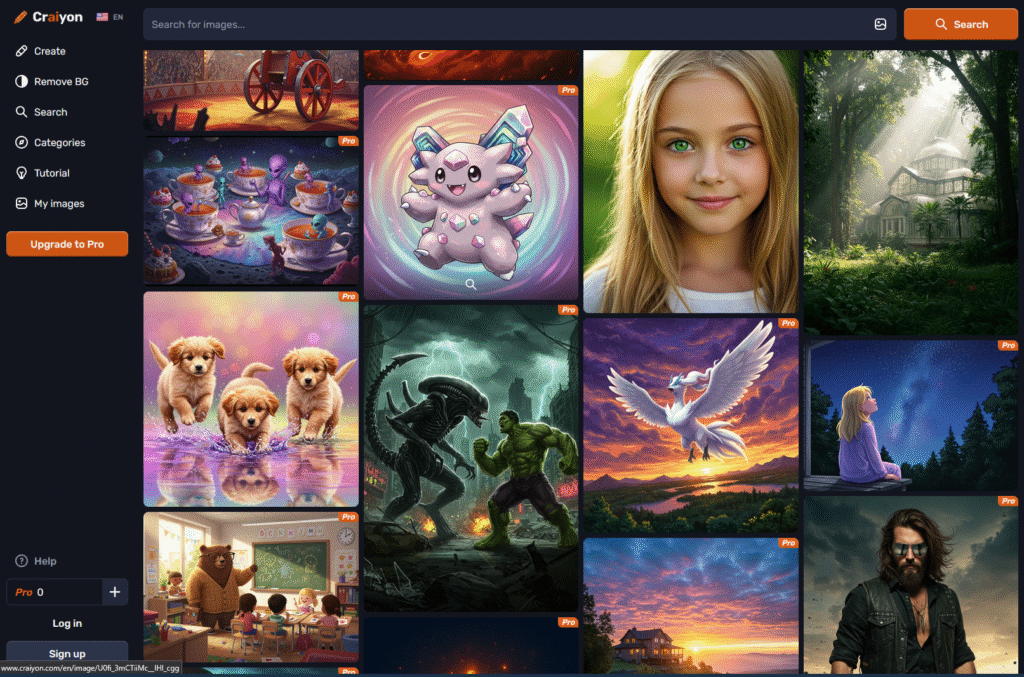
At its heart, Craiyon is a playground for your imagination. Specifically, it handles everything from realistic photos to weird cartoons. The interface is very simple. For instance, you see a search bar. You type your prompt. Then, you click a button. Consequently, the AI gives you a grid of nine images. Therefore, the process is very fast and fun.
The Power of Accessibility
The secret of Craiyon is its open nature. Specifically, it lives in your web browser. You do not need to download heavy software. Moreover, you do not need a powerful computer. The AI works on the company’s servers. Consequently, you can use it on your phone or an old laptop. Therefore, it is the best tool for students and hobbyists.
2. The History: From DALL-E Mini to Craiyon
Innovation often starts small. Specifically, Craiyon began as an open-source experiment. It has a fascinating story of growth and rebranding.
The Visionary Behind the Tool
Craiyon was created by Boris Dayma. Specifically, he is a machine learning engineer. He launched the project in July 2021. Initially, it was part of a coding competition. He wanted to make a version of OpenAI’s DALL-E that everyone could use. Consequently, he named it “DALL-E Mini.”
The Rebranding Story
The project became very famous very fast. Specifically, millions of people used it to make memes. However, the name caused confusion with OpenAI. Therefore, in 2022, the tool was renamed to Craiyon. This name mixes “crayon” and “AI.” Consequently, it built its own unique brand. In 2026, it is a stable company with its own team of researchers. Therefore, it is no longer just a “mini” version of something else. It is a leader.
3. How Does Craiyon Work? The Technical Engine
Understanding how Craiyon works is very interesting. Specifically, it uses “Deep Learning” to think like a human artist.
The Neural Network Brain
Craiyon uses a complex system of neural networks. Specifically, these networks were trained on millions of images. The AI looked at photos and their descriptions for years. Consequently, it learned what a “sunset” or a “cat” looks like. In 2026, it uses a model called GigaGAN. This makes it much faster than older versions. Therefore, you get sharp images in seconds.
The Generation Process
When you type a prompt, the AI breaks it into tokens. Specifically, it looks for keywords and the “vibe” of your words. Then, it creates a rough sketch. Step by step, it adds details and colors. Consequently, a full image appears. It gives you nine options at once. Therefore, you can pick the one that fits your vision the best.
Constant Updates
The tool is always getting better. Specifically, the team updates the model every month. They fix how it draws faces and hands. In 2026, the quality is much higher than in 2022. Consequently, it can handle complex ideas. Therefore, it remains a top-rated choice for millions.
4. Who Can Benefit from Using Craiyon?
Craiyon is a versatile tool for many types of people. Specifically, it touches many industries in 2026.
Artists and Designers
For designers, Craiyon is a great way to brainstorm. Specifically, it helps them see ideas fast. They do not need to sketch everything by hand. Instead, they type a prompt. Consequently, they get 10 different versions of an idea in a minute. Therefore, it speeds up the creative process.
Content Creators and Marketers
Marketers use Craiyon to make unique social media posts. Specifically, it helps them create eye-catching visuals for ads. They can make images that do not exist in stock photo sites. Consequently, their ads look fresh and unique. Therefore, it is a must-have for local brand growth.
Teachers and Students
In schools, Craiyon is a powerful learning tool. Specifically, teachers use it to illustrate hard lessons. Students use it to make creative projects for history or science. Consequently, learning becomes more visual and engaging. Therefore, it is a great tool for modern education.
Small Businesses and Startups
Startups often have no budget for pro artists. Specifically, Craiyon levels the playing field. They can make logos and product mockups for free. Consequently, they look professional from day one. Therefore, Craiyon is helping small brands compete with giants.
5. Craiyon Pricing and Plans in 2026
To use Craiyon’s power, you can pick from several plans. Specifically, the prices are kept low for everyone.
| Plan | Price (Monthly) | Key Features |
| Free Plan | $0 | Unlimited images. Includes ads. Slow generation (1-2 mins). |
| Supporter | $5 | No ads. Fast generation (20 secs). High resolution. No watermark. |
| Professional | $20 | Priority support. Private images. Commercial license included. |
| Enterprise | Custom | Custom models for teams. API access for developers. |
Notably, many hobbyists pick the Supporter plan. Specifically, it removes ads and watermarks for a low price. For official updates, visit the Craiyon Pricing Page. Therefore, you can pick what fits your wallet.
6. A Step-by-Step Guide to Using Craiyon
If you want to start, follow these simple steps today.
Step 1: Open the Website
First, go to the Craiyon website. Specifically, you do not need to create an account for basic use. You will see a large text box. This is where you put your ideas. Consequently, you are ready to start immediately.
Step 2: Write a Smart Prompt
Next, type what you want to see. Specifically, be very clear.
- Bad Prompt: “A dog.”
- Good Prompt: “A happy golden retriever in a space suit on the moon, digital art style.”Moreover, you can use the “Negative Prompt” box. Specifically, type things you do not want to see, like “blurry” or “low quality.” Therefore, the AI gives you a better result.
Step 3: Choose and Download
Click “Draw.” Specifically, wait about 15 to 45 seconds. You will see nine images. Click on the one you like. Then, click the “Download” button. Consequently, you have a high-quality file for your project. Therefore, you can share it with the world.
7. Advantages and Disadvantages of Craiyon
No tool is perfect. Specifically, Craiyon has its strengths and some notable limits.
The Advantages (Pros)
- Unlimited and Free: You can make as many images as you want for $0.
- Very Easy to Use: No complex settings. Just type and draw.
- No Sign-Up: You can start without giving an email.
- Unique Style: It has a specific artistic look that many people love.
- Mobile Friendly: It works great on any smartphone browser.
The Disadvantages (Cons)
- Ads on Free Plan: The free version has many ads.
- Lower Quality: It is not as realistic as Midjourney or DALL-E 3.
- Faces and Hands: It still struggles with drawing perfect human fingers.
- Slow Speed: The free version can be slow during busy hours.
8. Top 5 Alternatives to Craiyon AI in 2026
Craiyon is a leader, but it is not alone. Specifically, other tools offer different levels of quality.
- Midjourney: The king of high-quality art. Specifically, it makes images that look like real photos. It works through Discord and is a paid tool.
- DALL-E 3 (OpenAI): The best for following complex rules. Specifically, it is built into ChatGPT. It is very smart and professional.
- Stable Diffusion: The best for tech-savvy pros. Specifically, it is open-source. You can run it on your own hardware for free.
- Google Gemini (Imagen 4): Google’s top AI for images. Specifically, it is very fast and realistic. It works inside your Google apps.
- Adobe Firefly: Best for designers. Specifically, it is safe for business use. It works inside Photoshop.
9. Frequently Asked Questions (FAQ) for Buyers
Are you ready to use Craiyon for your business? Here are the top questions from 2026.
1. Is Craiyon truly free to use?
Specifically, “Yes.” You can generate images for free forever. However, you will see ads. Moreover, your images will be public. For private use, you need a paid plan.
2. Can I use Craiyon images for my products?
Yes. In 2026, Craiyon allows commercial use if you have a paid plan. Specifically, you own the rights to the art. Consequently, you can put them on T-shirts or ads. Therefore, it is a great tool for small shops.
3. Does Craiyon work in Arabic?
Currently, it works best with English prompts. Specifically, the AI understands English the most. However, you can use simple Arabic words, and it might work. Therefore, use a translator for the best results.
4. How does it handle privacy?
On the free plan, your images can be seen by others. Specifically, they are added to the public gallery. However, on the Professional plan, your work is private. Consequently, your secrets stay safe.
5. Why are the faces blurry sometimes?
Specifically, this is a limit of the AI model. It tries to draw fast. Therefore, it misses small details on faces. In 2026, the “Upscale” tool helps fix this. Consequently, you get a much sharper face in the final file.
Conclusion: Unleash Your Creativity Today
In conclusion, Craiyon AI 2026 is a massive tool for the modern world. Specifically, it has evolved from a small code project into a full creative hub. For students, shop owners, and meme makers, it offers a way to look professional without the high cost. It is fast, smart, and built for your ease.
However, use it with a smart plan. Specifically, remember to experiment with your prompts. As AI keeps growing, Craiyon remains a top-rated choice for everyone. Therefore, stay curious and keep experimenting. The future of art is here. Specifically, it is waiting for your next great idea.