Digital art generation continues to evolve at a relentless pace. Instead of relying solely on complex text prompts or manual painting, creators can now breed, blend, and remix visual assets.
Additionally, Artbreeder stands directly at the forefront of this creative shift. Specifically, the platform transforms image generation into an interactive, genetic process. Consequently, this comprehensive guide examines how the engine works, evaluates its core toolset, breaks down subscription costs, and compares it against top industry alternatives.
- 1. What Is Artbreeder?
- 2. Behind the Platform: Origins and Technology
- 3. Core Features and Technical Capabilities
- 4. Practical Use Cases Across Industries
- 5. Pricing and Subscription Plans
- 6. Step-by-Step Workflow Guide
- 7. Technical Strengths and Limitations
- 8. Top 5 Alternatives to Consider
- 9. Frequently Asked Questions (FAQ)
- Conclusion
1. What Is Artbreeder?
Artbreeder is a cloud-based creative platform powered by Generative Adversarial Networks (GANs). Unlike traditional image generators that construct visuals entirely from text prompts, Artbreeder treats images like biological organisms with distinct genetic traits.
In practice, users combine two or more “parent” images to produce unique “child” variations. The system then analyzes underlying visual features, such as facial symmetry, color palettes, lighting, and textures. As a result, creators can manipulate these visual attributes smoothly with intuitive sliders.
[Parent Image A]  +  [Parent Image B]
        │                   │
        └───► [ Latent Space Blend ] ◄─── Slider Adjustments (Age, Style, Tone)
                     │
                     ▼
             [ Child Artwork ]
Additionally, testing shows this evolutionary approach addresses one of the major bottlenecks in AI art: enabling precise, fine-grained control. Rather than rolling the dice with random prompt generations, you steer visual changes iteratively with remarkable precision.
2. Behind the Platform: Origins and Technology
The platform originally began as Ganbreeder, a research-driven project launched by computational artist Joel Simon. Specifically, his primary goal was to democratize creative exploration by making complex neural networks accessible through a gamified interface.
Over the years, the underlying architecture expanded significantly. Furthermore, Artbreeder evolved from basic BigGAN experiments into a complete creative suite. Today, it successfully combines custom latent-space models, modern diffusion pipelines, and collaborative datasets.
3. Core Features and Technical Capabilities
Artbreeder offers a diverse set of creative modules tailored for distinct workflows:
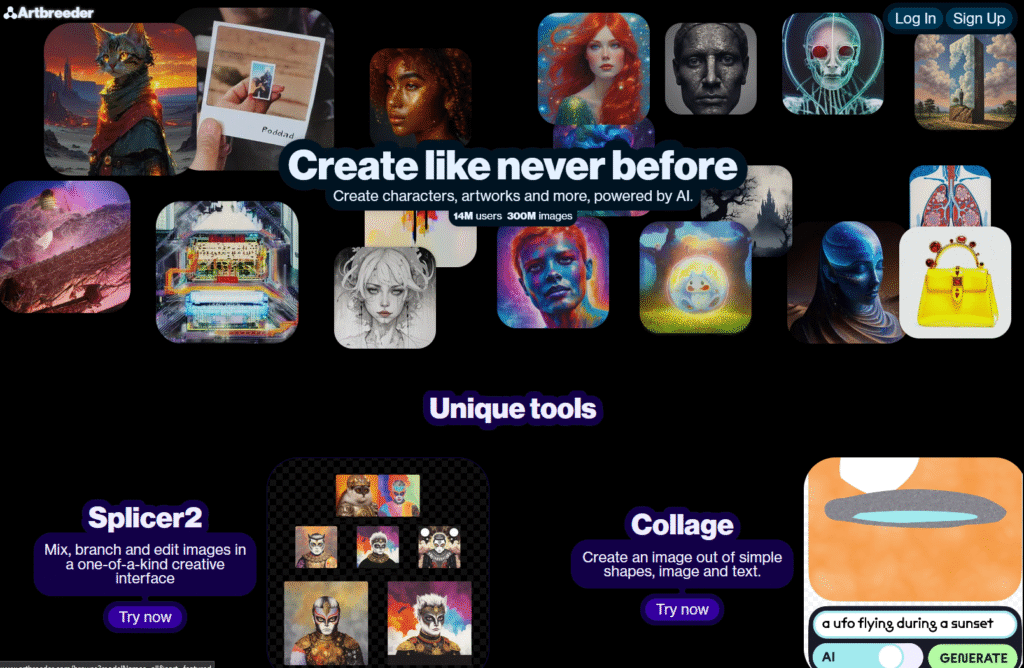
- The Splicer (Genetic Mixing): This signature engine blends multiple source images together. Therefore, you can cross-breed portraits, landscapes, or abstract concepts while adjusting specific gene sliders like age, mood, and lighting.
- Artbreeder Collage: This module combines rough brush sketches, basic shapes, and text prompts. Consequently, the engine interprets your rough composition and instantly transforms it into a high-resolution painting.
- Poser & Outpainter: The Poser tool maps 2D characters onto adjustable 3D skeletal rigs, which gives you direct control over character posture. Meanwhile, the Outpainter expands canvas boundaries seamlessly beyond the original frame.
- Community Lineage Tracking: Every public creation maintains an open “family tree.” Thus, you can trace an image back through its parent generations, inspect the exact slider parameters, and branch off your own iterations.
From an interface perspective, the real-time feedback loop feels intuitive and responsive. However, extreme slider combinations can occasionally introduce visual artifacts. Even so, the ability to isolate specific facial features makes character iteration exceptionally fast.
4. Practical Use Cases Across Industries
Various creative disciplines integrate Artbreeder to speed up production workflows:
- Concept Artists & Game Developers: Rapidly prototype consistent character rosters, NPC variations, and mood boards without starting from scratch.
- Writers & Worldbuilders: Visualize novel protagonists, fantasy landscapes, and historical environments, which helps maintain visual continuity across storytelling projects.
- Storyboard Teams: Block out rough compositions, staging, and lighting schemes using the Collage tool before moving to final rendering.
- Content Creators: Design distinctive avatars, channel banners, and digital assets with personalized stylistic traits.
5. Pricing and Subscription Plans
Artbreeder operates on a freemium credit model. Free accounts provide unlimited standard-resolution creation, whereas premium tiers unlock higher rendering speeds, advanced privacy controls, and high-resolution export credits.
| Plan | Monthly Price | High-Res Credits | Key Inclusions |
| Free | $0.00 | 3 credits (one-time) | Unlimited standard creations, public feed visibility |
| Starter | ~$8.99 | 100 / month | Fast processing, custom model uploads, standard storage |
| Advanced | ~$18.99 | 500 / month | Priority rendering queues, private creation mode |
| Champion | ~$38.99 | 1,500+ / month | Maximum rendering speed, complete privacy, API access |
From a price-to-performance perspective, the Starter Plan offers the best value for independent artists. Specifically, it provides enough monthly credits for standard design projects without requiring a heavy financial commitment.
6. Step-by-Step Workflow Guide
Getting started with Artbreeder involves three straightforward steps:
- Set Up an Account: First, visit the official portal at Artbreeder and register using your email or Google credentials.
- Select Your Canvas: Next, open the workspace and choose an engine based on your current project (for example, Portraits for character design or Collage for environments).
- Blend and Refine: Select a base image from the public library or upload your own. Afterward, adjust the feature sliders, introduce a second parent image to cross-breed traits, and download your final asset once satisfied.
7. Technical Strengths and Limitations
Strengths
- Provides exceptional control over subtle facial expressions and character traits.
- Employs intuitive slider mechanics that eliminate prompt-engineering fatigue.
- Fosters community collaboration through transparent lineage tracking.
- Delivers fast rendering times directly inside standard web browsers.
Limitations
- High-resolution exports remain tied to recurring credit consumption.
- Extreme latent-space mixing can occasionally yield visual distortions.
- Dynamic multi-character scenes still require external post-processing tools.
8. Top 5 Alternatives to Consider
If your workflow demands capabilities beyond genetic image mixing, several alternative tools offer distinct advantages:
- Midjourney: The leading benchmark for photorealism, detailed cinematic lighting, and complex text prompt comprehension.
- Leonardo.ai: A versatile creative suite that offers custom model training, canvas inpainting, and built-in asset management.
- DALL-E 3: Integrated directly into ChatGPT, excelling at strict prompt adherence and complex multi-object compositions.
- Stable Diffusion: An open-source powerhouse suited for technical creators who require complete local pipeline control.
- Artguru: A lightweight web app tailored for quick face swaps, stylized avatars, and everyday artistic filters.
9. Frequently Asked Questions (FAQ)
Does Artbreeder allow commercial use of generated art?
Yes. Images generated under paid subscription tiers grant full commercial usage rights, because the license permits use in commercial books, indie games, and marketing materials.
How does Artbreeder differ from prompt-based generators like Midjourney?
Midjourney builds scenes from textual descriptions from scratch. In contrast, Artbreeder focuses on iterative genetic remixing, letting you cross-breed existing images and modify specific visual features with precision sliders.
Can I keep my generated images private?
Free-tier creations appear on the public community feed automatically. However, you can work in a private workspace and hide your lineage by subscribing to the Advanced or Champion tiers.
Conclusion
Artbreeder remains one of the most distinctive platforms in the generative AI ecosystem. Specifically, by prioritizing interactive breeding over pure text prompting, it provides character designers and digital artists with an intuitive, non-destructive editing workflow. Ultimately, for creators seeking granular control over portraits and rapid concept iterations, it serves as an indispensable production asset.
Sources & References
- Artbreeder Official Portal: Official platform workspace, image mixing tools, and feature suites.
- Artbreeder About & Tech Overview: Details on BigGAN, StyleGAN implementation, and the history behind Ganbreeder.
- Artbreeder Commercial Rights & Support: Documentation on CC0 licensing, commercial use rights, privacy mode, and account tiers.
- Generative Adversarial Nets Research (arXiv): The foundational research paper on GAN architectures by Ian Goodfellow et al.
READ MORE
DALL-E | Know The MAGIC art of the AI World