The world of content creation is changing faster than ever before. In the past, making a professional video required a lot of money and a full film crew. However, everything has changed because of Synthesia AI. This powerful tool allows you to create high-quality videos just by typing text. Actually, it uses digital “avatars” that look and speak like real humans. As a result, businesses and creators are now saving thousands of dollars every month. In this guide, we will explore every part of Synthesia AI. Specifically, we will look at how it works, what it costs, and why it is the leader in the market in 2026.
What Exactly is Synthesia AI?
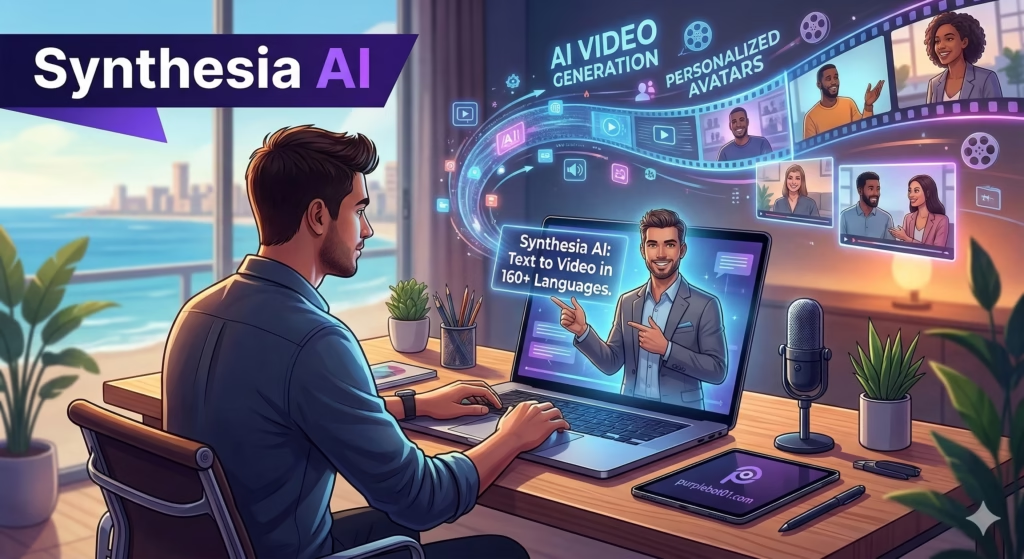
To begin, we must define what Synthesia AI actually is. In simple terms, it is an AI video generation platform. Unlike traditional video editing tools, you do not need a camera or a microphone to use it. Instead, you choose a digital presenter and provide a script. Then, the AI generates a video where the presenter speaks your words with perfect lip-sync.
The Rise of Synthesia 3.0
In early 2026, the company released a major update called Synthesia 3.0. Consequently, the AI is now much more expressive. For example, the avatars can now use micro-gestures like nodding or raising an eyebrow. Therefore, the videos look much more natural than they did a few years ago. As a result, many viewers cannot even tell the difference between an AI avatar and a real person.
Visit the official Synthesia website
How Synthesia AI Works: The Simple Science
You might wonder how a computer can create a realistic human face that talks. Actually, the technology is very advanced. Specifically, Synthesia uses “Generative AI” and deep learning.
Training the Models
Initially, real actors are filmed in a studio. They record many different facial movements and speech patterns. After that, the AI analyzes this data. Consequently, the AI learns how to replicate the actor’s face in a digital format. This means that when you type a word, the AI knows exactly how the avatar’s lips should move to say that word.
Text-to-Video Transformation
Essentially, the process is a text-to-video transformation. When you enter your script, the AI processes the language first. Then, it chooses the correct sounds and matches them to the digital actor’s mouth. Moreover, the AI can do this in over 160 different languages. Therefore, you can create a video in English and translate it into Arabic or Spanish with just one click.
Key Features of Synthesia 3.0
The latest version of the platform has many new features that make video creation very easy. Let us look at the most important ones.
1. Expressive AI Avatars
First, let us talk about the avatars. Specifically, there are now over 240 different avatars to choose from. These avatars represent different ages, ethnicities, and professional looks. Furthermore, with the new “Expressive” feature, they can now show emotions. As a result, your training videos or ads feel much more engaging.
2. AI Video Assistant
Next, we have the AI Video Assistant. In the past, you had to write your own scripts. However, you can now upload a PDF, a PowerPoint deck, or even a website link. Then, the AI will automatically create a video structure and a script for you. Consequently, this saves you hours of planning time.
3. AI Dubbing and Translation
Another amazing feature is AI Dubbing. Specifically, you can upload an existing video of yourself speaking. Then, the AI can translate your voice into another language while keeping your original tone. Moreover, it adjusts the video so your lips match the new language perfectly. Therefore, your content can reach a global audience instantly.
Learn more about AI video trends at Forbes
Step-by-Step Guide: How to Create Your First AI Video
If you are a beginner, do not worry. Actually, the platform is designed to be very simple. Specifically, you can follow these four steps to finish your first project.
Step 1: Start with a Script or Prompt
First, you need to provide the content. You can type your script directly into the editor. Alternatively, you can use the AI Assistant to generate a script from a simple prompt. For example, you could say, “Write a 2-minute training script about cybersecurity.” Within seconds, the AI will give you a professional draft.
Step 2: Select Your AI Avatar
Next, you need to choose who will speak in your video. Specifically, you should choose an avatar that matches your brand. For instance, if you are making a formal business update, choose an avatar in a suit. On the other hand, if it is a casual social media post, choose a more relaxed character.
Step 3: Customize the Visuals
Furthermore, you can edit the background of your video. You can use pre-made templates or upload your own images and videos. In addition, you can add text overlays, icons, and background music. Consequently, your video will look like it was made in a professional studio.
Step 4: Generate and Export
Finally, once you are happy with the preview, click “Generate.” Then, the AI will process the video. After a few minutes, you can download the video in high definition. Moreover, you can share it directly to social media or your website.
Pricing and Subscription Plans in 2026
Synthesia AI offers different plans for individuals and large companies. Understanding these plans will help you pick the best one for your budget.
Synthesia Pricing Table
| Plan | Price (Monthly) | Best For | Key Benefits |
| Free | $0 | Testing | 3 minutes of video per month and 6 avatars. |
| Starter | $29 | Individuals | 10 minutes of video per month and 70+ avatars. |
| Creator | $89 | Professionals | 30 minutes of video per month and 90+ avatars. |
| Enterprise | Custom | Large Teams | Unlimited minutes, custom avatars, and SSO. |
If you are a solo creator, the Starter plan is usually enough. However, if you need to create a lot of content for a website like purplebot01.com, the Creator plan is a better choice. Specifically, it gives you more minutes and better avatars. Alternatively, you can check the official Synthesia pricing page for the latest updates.
Best Alternatives to Synthesia AI
While Synthesia is the leader, there are other great tools available. After all, you might prefer a different style or price point. Therefore, you should consider these top alternatives.
1. HeyGen
HeyGen is very popular in 2026. Specifically, it is known for its “Instant Avatar” feature. This allows you to create a digital twin of yourself in just a few minutes. Furthermore, many users find its interface to be very modern and easy to use.
2. Colossyan
Colossyan is a great choice for corporate training. Specifically, it allows you to have “conversations” between two different AI avatars on the screen. Consequently, it is perfect for role-playing scenarios in HR training.
3. Elai.io
Elai.io is another strong competitor. Notably, it focuses on helping users turn blog posts into videos. If you have a lot of written content on your website, Elai can help you convert it into video format very quickly.
4. DeepBrain AI
DeepBrain AI focuses on ultra-realistic “AI Humans.” Specifically, they are often used in retail kiosks and for news broadcasting. Therefore, if you need a very high-end, broadcast-quality look, this is a great option.
Using Synthesia AI for Your Professional Growth
As a psychology student and a website manager, Ali, you can use Synthesia in many ways. Actually, it can help you build your brand and your career.
For Psychology Education
For instance, you can create educational videos about complex psychology topics. By using an AI avatar, you can explain clinical theories in a way that is easy to understand. Furthermore, you can translate these videos into different languages to reach more students around the world.
For purplebot01.com
In addition, you can use AI video to grow your website. Specifically, you can turn your blog posts into short videos for YouTube and TikTok. As a result, you will get more traffic and better SEO rankings. Therefore, Synthesia is a powerful tool for your digital marketing strategy.
Frequently Asked Questions (FAQ)
To wrap up this guide, here are the answers to the ten most common questions about Synthesia AI.
1. Is Synthesia AI safe to use?
Yes, it is. Synthesia is SOC II and GDPR compliant. Specifically, they have strict rules about how they use data. Furthermore, they do not allow users to create videos of celebrities or politicians without permission.
2. Can I create an avatar of myself?
Absolutely. This is called a “Personal Avatar.” However, you usually need to pay an extra fee for this feature. Once it is ready, you can create videos of yourself speaking without ever standing in front of a camera.
3. Does it work on Mac and Windows?
Yes. Synthesia is a web-based tool. Therefore, it works on any computer with a modern browser like Chrome or Safari. In addition, there is no software to download.
4. How long does it take to generate a video?
Generally, it takes about 5 to 10 minutes to generate a 1-minute video. However, this can change depending on how busy the servers are.
5. Can I use the videos for YouTube ads?
Yes, you can. If you have a paid plan, you own the rights to the videos you create. Consequently, you can use them for commercial purposes and advertising.
6. Does Synthesia support Arabic?
Yes, it has excellent support for Arabic. Specifically, it offers multiple voices and accents for different regions. Therefore, it is great for the Middle Eastern market.
7. What is the “AI Script Assistant”?
This is a built-in tool that uses ChatGPT-like technology. Specifically, it helps you write your video script from scratch. As a result, you never have to worry about writer’s block.
8. Can I add my own background music?
Yes, you can. You can choose from a library of songs inside the platform. Alternatively, you can upload your own MP3 files to match your brand style.
9. What is a “Custom Avatar”?
A custom avatar is a digital twin made specifically for your company. For example, you could create an avatar of your CEO. Then, they can “speak” to thousands of employees in different languages instantly.
10. Can I try Synthesia for free?
Yes, you can. There is a free version that allows you to create a short test video. Consequently, you can see how it works before you decide to buy a plan.
Tips for Better AI Videos
To get the best results, you should follow these three simple tips.
- Write Like You Speak: First, make sure your script sounds natural. Avoid long, complex sentences. Instead, use simple language that the AI can pronounce easily.
- Use Pauses: Second, you can add small pauses in the script. This makes the avatar sound more human and less robotic.
- Choose the Right Avatar: Third, always match the person to the topic. Therefore, the video will feel more authentic to your audience.
The Future: AI Video Agents
Looking ahead, Synthesia is moving toward “AI Video Agents.” In the future, these agents will be able to talk to your customers in real-time. Imagine a digital person on your website that can answer questions face-to-face. Furthermore, these agents will be able to show emotions and react to what the customer says. Consequently, the line between human and AI interaction will continue to disappear.
Conclusion
In summary, Synthesia AI is a revolutionary tool for 2026. It makes video production fast, easy, and affordable for everyone. Whether you are a student, a marketer, or a business owner, this technology can help you achieve your goals. While there are other alternatives, Synthesia’s quality and features remain the best in the market.
Now is the perfect time to start. So, go to the website, create your account, and make your first AI video today. After all, the future of content is video, and AI is the key to unlocking it.
Read More
Opus Clip : The powerful Future of AI Short Video Creation
VEO 2: The Future of AI Epic Video Generation